

How do companies benefit from cloud computing? What opportunities and challenges does the cloud actually offer? Companies around the world face the question of whether and how they want to move to the cloud. There are a few important things to consider, starting with long-term planning. In this article, we cover cloud computing itself, its advantages and disadvantages, and other key aspects of the topic.
What is cloud computing anyway?
Cloud computing is the provisioning of computing resources such as server infrastructure, storage facilities, or software over the Internet. Using the cloud offers faster innovation, flexible use of resources, and economies of scale.
Why should you consider cloud computing?
According to a survey by Deloitte, security and data protection, data modernization, and finally the costs and services of IT operations are the most important drivers for cloud migration.
- In view of the rapidly rising number of cyberattacks, companies are looking for intelligent solutions that provide the highest possible IT security. Cloud providers are often able to meet the security requirements of companies and even public institutions. Cloud services offer storage security, encryption, and auditing. In addition, data is often stored redundantly so it can be recovered quickly and easily in the event of a failure. Cyberattacks targeting company data have increased in recent years, and victims often have to pay millions to recover their data. Storing data redundantly in different locations helps mitigate these risks.
- Data modernization includes one especially important advantage for many users and for remote work in particular: decentralized storage. This gives users access to company data regardless of location or device.
- Finally, the lower costs and services of IT operations are also a decisive advantage. Cloud computing is service-oriented, so only the service actually used is billed.
In summary, migrating to the cloud can be of great benefit if it is planned and implemented well.
What should you consider when migrating to cloud services?
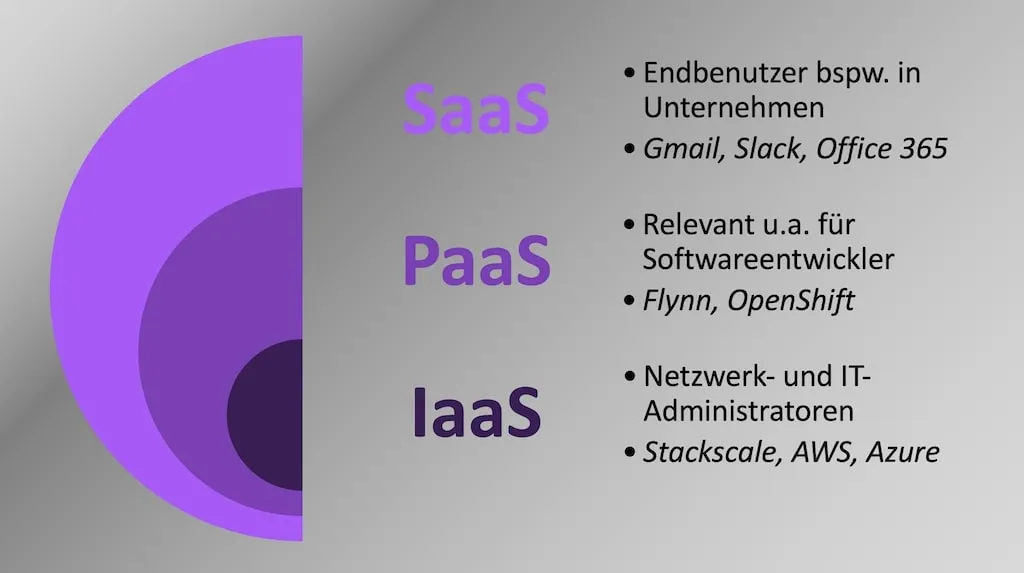
If you are planning to introduce cloud services across your company, the first step is choosing the cloud computing architecture. Three main approaches are common.
Infrastructure-as-a-Service (IaaS)
IaaS provides fundamental compute, storage, and network resources on demand with pay-as-you-go pricing. Migrating infrastructure to an IaaS solution can reduce maintenance effort for on-premises data centers, save hardware costs, and make the latest technologies available at all times, such as real-time analytics. It also gives you the ability to scale IT resources when needed.
This kind of scaling is especially relevant for web shops: when demand spikes, for example around Christmas, you can scale up; when demand drops, you can scale down again.
Platform-as-a-Service (PaaS)
PaaS provides a development and deployment environment in the cloud that gives companies access to the resources they need to operate their business and offer a wide range of solutions to employees and customers. These can include simple cloud-based apps as well as large enterprise applications. Like IaaS, PaaS includes infrastructure components such as servers, storage, and networking. In addition, PaaS also offers development tools, business intelligence services, data management systems, and more.
Software-as-a-Service (SaaS)
With SaaS, users can use cloud-based apps over the Internet. At its core, this is a licensing and distribution model in which software applications are offered online. Usage is usually subscription-based, which makes it ideal for business software. Common examples are email, calendars, and office tools, but also larger applications such as CRM systems.
Another important point to keep in mind is whether your company is best suited to a public, private, or hybrid cloud. To make that decision, you should evaluate upcoming cloud applications case by case and determine the best solution based on cost and performance requirements.
Public Cloud
A public cloud is offered by a provider that makes its services openly accessible to anyone over the Internet. Examples include webmail services or Google Docs. Paid services such as Microsoft Office 365 also fall into this category. On the infrastructure side, this includes providers such as Amazon Web Services (AWS), Google Cloud Platform (GCP), Microsoft Azure, or Alibaba.
Private Cloud
When data protection and IT security requirements are especially high, companies often prefer to keep their IT services in-house and accessible only to their own employees.
Hybrid Cloud
A hybrid cloud is a combination of the above models. Some services run with public providers, while privacy-sensitive applications and data are processed internally by the company. The challenge here is separating those two business processes cleanly.
In addition to the areas above, migration to the cloud naturally has to take company size into account. Relevant factors include data volumes and the complexity of systems, which can slow down the migration. Large companies usually need more time to start and complete the process.
Moving to the cloud will also affect your company’s current processes. Good planning therefore includes identifying possible risks and delays so you can prevent them. Only processes that are expected to improve in the cloud should be migrated.
Choosing your cloud provider
When choosing a cloud provider, you should evaluate Quality of Service (QoS). QoS describes the quality of a communication service from the user’s point of view. Factors such as functionality, legal compliance, contracts, server geolocation, certifications, flexibility, and transparency all influence the quality of a cloud provider.
There is no single best provider. Besides the big names like AWS, Azure, or GCP, there are many other providers with an excellent reputation. The important point is that solutions already exist for every need, regardless of industry or company size.
Advantages and challenges of cloud migration
To close, we want to give you a final overview of some benefits and challenges. Migrating to the cloud offers many advantages, including the lower IT costs and improved performance typically associated with cloud services. At the same time, cloud migration also comes with challenges that need to be considered before, during, and after the move.
Advantages
1. Cost optimization
A broad move to the cloud can significantly reduce resource and maintenance costs.
Organizations pay only for what they actually use. That creates a completely new cost structure, because even rarely used resources can be made available without cost problems.
At the same time, the company saves not only direct costs, but also indirect costs because employees can work more efficiently.
2. Availability
Most cloud providers have multiple globally distributed locations. That means individual branches can significantly improve system performance by executing workloads closer to users or customers.
In addition, organizations can use more powerful systems whenever needed. If new business areas with higher demand are opened, they only need to book additional capacity, because major cloud providers such as AWS or Azure always offer the latest and best technology.
3. Security and compliance
In our blog post about FinTechs, we already discussed the importance of compliance. Of course, compliance matters for every company, even though the scope and necessity can vary widely.
Why is compliance important in the context of cloud computing? Some providers offer tailored services that make it easy to meet compliance requirements. That flexibility and customer focus are ideal for highly regulated industries such as finance and healthcare.
Still, the same rule applies here: no matter how well a cloud provider works with your company, the company itself is ultimately responsible for compliance and customer protection.
Challenges
1. Planning
In chronological order, planning is the first and often biggest challenge for large-scale cloud migrations, and it is often the reason a migration fails.
Planning must begin with clear migration goals and strategies that support both the company itself and the relevant stakeholders.
This helps mitigate risks and reduce potential cost drivers such as unexpected data loss.
2. Costs
Although a cloud migration can increase return on investment both in the short and the long term, it initially costs time, money, and resources. In combination with point 1, planning the upcoming costs is therefore critical. Potential issues in financial planning should also be considered. It is better to be positively surprised than to run into serious problems because the budget was too small.
3. Adoption and training
Training is required before, during, and after a cloud migration. Although these courses cost money, they also make the migration much smoother and help employees get up to speed quickly. Good onboarding and continued training lead to a smooth migration process and, ultimately, the long-term success of a cloud migration.
Conclusion
In summary, migrating to the cloud can be very beneficial when it is planned and implemented well. Beyond the core topics discussed here, there are many other important aspects that should be considered and planned for when moving to the cloud.
When moving to the cloud, make sure you incorporate the requirements and wishes of the different departments in your organization as well as the needs of all relevant stakeholders. That is how you will reach your goal together and accomplish more with the cloud.
Do you have any questions or suggestions? Feel free to contact us and we will be happy to talk through your plans and strategies for your individual IT projects.
FAQs
What is cloud computing?
Why should you consider cloud computing?
What should you consider when migrating to cloud services?

![Agentic Engineering Hiring Interview 2026 [+21-Question PDF]](/_astro/agentic-engineering-interview-featured-de.BlvVAp5j_Z9ib7o.webp)